Rent the boring parts: shipping Photo Pond in a day on free tiers
Most side projects don’t die in the code. They die in the setup: provisioning a database, wiring storage, configuring auth, building a deploy pipeline, and then paying for all of it every month before anyone has looked at the thing.
Photo Pond is my personal photo gallery. I built it to test a different approach: rent everything that isn’t the idea, spend money only on what makes it special, and keep the code mine so I can move it later.
The result:
- The first working version (upload, gallery, auth, storage) landed in a single day of commits.
- Infrastructure costs $0/month on free tiers.
- The only real bill is the AI that catalogues the photos: about $0.01 per upload.
- All of the code sits in my GitHub repo, ready to deploy to my own AWS account when it outgrows the free tiers.
What Photo Pond does
You upload a photo from a laptop or phone. Without any manual tagging, Photo Pond:
- Reads the capture date and GPS position from EXIF.
- Turns the coordinates into a place name (“Bergen, Norway”).
- Generates a thumbnail.
- Asks Claude to look at the image and assign categories, descriptive tags and a short caption.
Visitors then browse an editorial-style gallery with category tabs, year and place filters, and a full-screen carousel.
 The public gallery. Claude assigned every category tab and count you see here, and search works across tags, years and places.
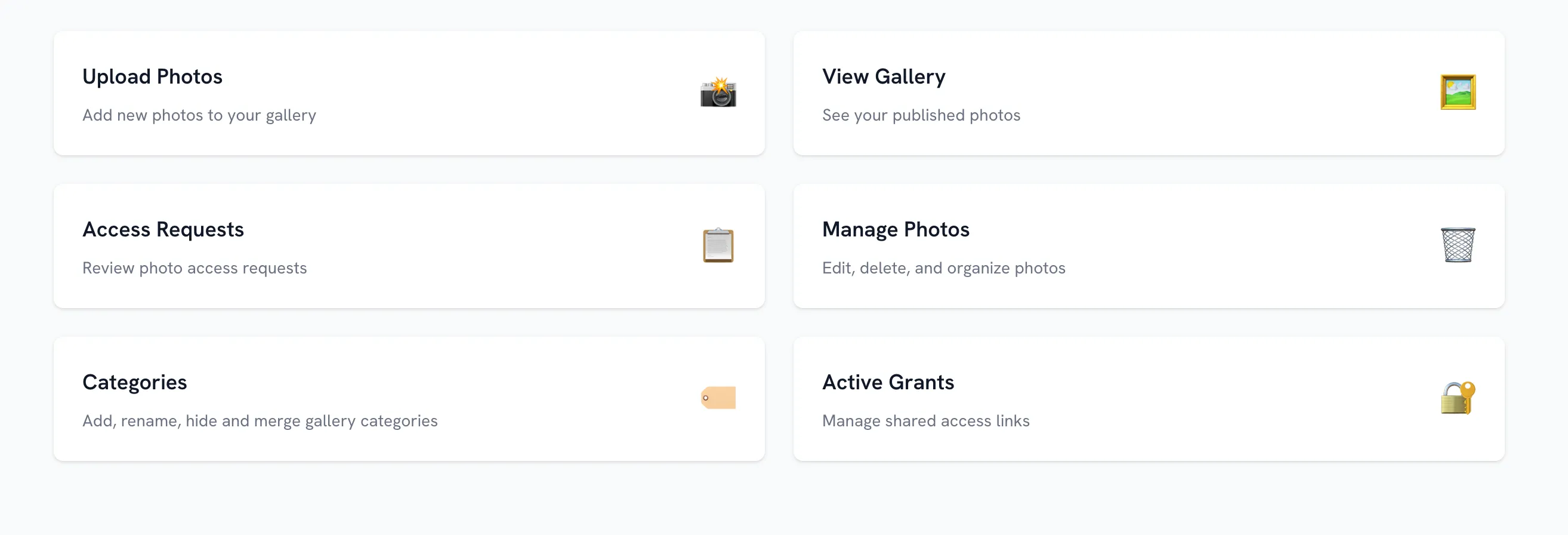 The admin dashboard, behind Google sign-in: upload, manage photos, curate categories and handle private access requests.
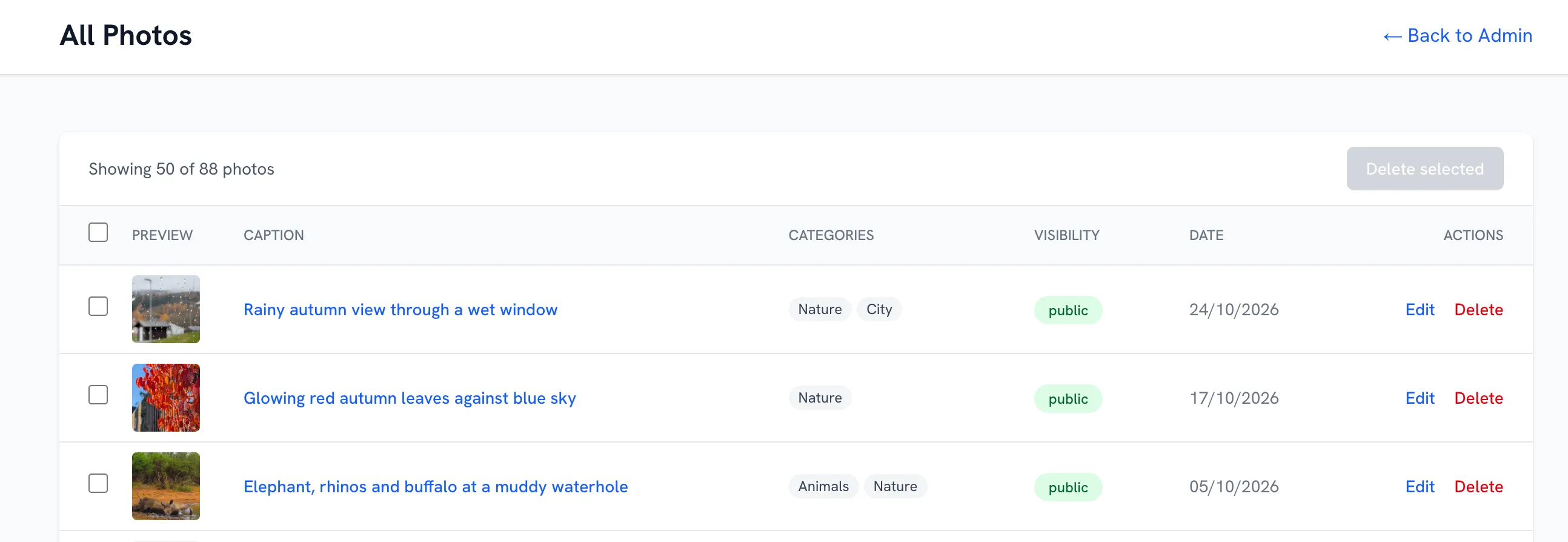 Manage Photos. Claude wrote every caption and category, and I didn’t type any of them. The row with no thumbnail is a failed upload, which is easy to spot and clean up from here.
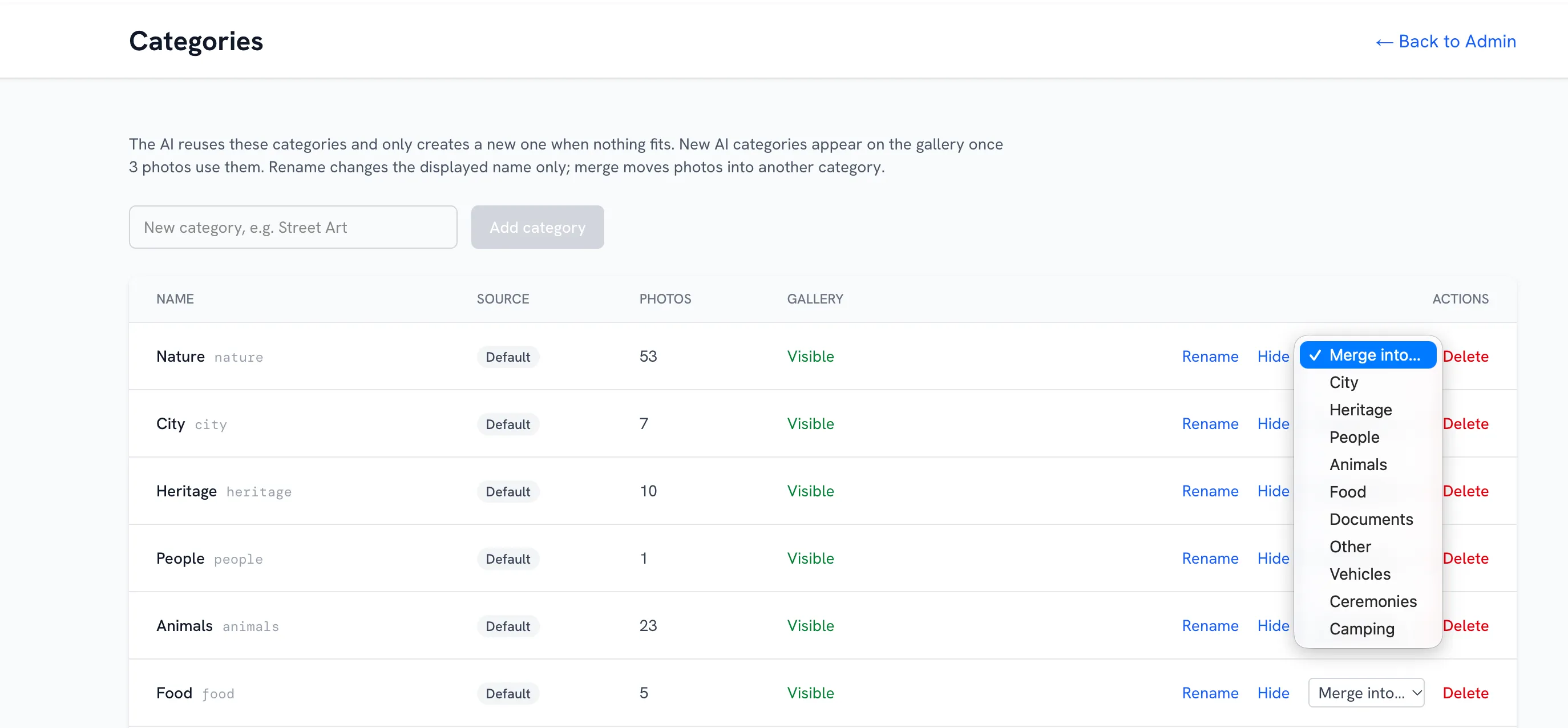 Categories. Claude reuses existing categories and only creates a new one when nothing fits. New ones stay hidden until three photos use them, and I can rename, hide or merge them.
Architecture at a glance
flowchart LR
    B[Browser] -->|pages & API| V[Vercel<br/>Next.js 16 + serverless functions]
    B -->|presigned PUT/GET| R2[(Cloudflare R2<br/>originals + thumbnails)]
    V --> N[(Neon Postgres<br/>metadata)]
    V --> A[Anthropic Claude<br/>vision classification]
    V --> G[Google OAuth<br/>admin sign-in]
    V --> U[(Upstash Redis<br/>rate limits)]
    V --> O[OpenStreetMap Nominatim<br/>GPS → place]
    GH[GitHub] -->|push to main| V
Each box is a managed service with a free tier. My job was to write the app, not to run infrastructure.
Let the free-tier limits shape the design
The most important design decision came straight from a free-tier limit. Vercel’s Hobby plan caps function request bodies at 4.5 MB, and a photo straight off a phone is often bigger than that.
So photos never pass through my server on the way in. The browser gets a short-lived presigned URL and uploads directly to object storage. It then asks the server to process the stored file:
sequenceDiagram
    participant B as Browser
    participant V as Vercel API
    participant R as R2
    participant DB as Neon
    participant C as Claude

    B->>B: SHA-256 each file
    B->>V: Already have these hashes?
    V->>DB: lookup
    V-->>B: skip exact duplicates
    B->>V: presign
    V-->>B: presigned PUT URL
    B->>R: PUT original (direct, any size)
    B->>V: notify(key)
    V->>R: fetch original
    V->>V: EXIF, geocode, thumbnail, perceptual hash
    V->>R: PUT thumbnail
    V->>DB: insert photo row
    V-->>B: done
    V->>C: classify 1024px copy (after response)
    C-->>V: categories, tags, caption
    V->>DB: update photo
I didn’t plan this pattern. The constraint forced it, and it turns out to be the right one anyway: compute stays small, uploads have no size cap, and the server only touches bytes it needs to.
The SaaS building blocks
| Concern | Service | Why this one | Free-tier limit that matters |
|---|---|---|---|
| Compute & hosting | Vercel (Hobby) | git push = deploy, preview URLs, built-in CDN |
1M invocations, 4 h active CPU / month, non-commercial |
| Database | Neon Postgres | Real Postgres, scales to zero, branch per PR | 1 GB storage, 100 CU-hours / month |
| Object storage | Cloudflare R2 | S3-compatible API, zero egress fees | 10 GB stored, 1M writes, 10M reads / month |
| Authentication | Google OAuth + NextAuth | No user store to build or protect | Free |
| Rate limiting | Upstash Redis | Serverless Redis over HTTP | Free tier |
| Geocoding | Nominatim (OSM) | Free reverse geocoding | 1 request/s (throttled and cached in code) |
| CI | GitHub Actions | Lint and type-check on every PR | Free for public/personal use |
| AI | Anthropic Claude | The actual differentiator | Pay-as-you-go |
A few notes on each:
- Vercel removed the deploy-pipeline project entirely. Merging to
mainputs the change live onphotopond.techforlife.in. Every pull request gets its own preview URL. - Neon gives me ordinary Postgres, so I use Drizzle ORM and standard SQL with no proprietary query layer. Scale-to-zero means an idle gallery costs nothing. The tradeoff is roughly a 0.5–1 s cold start on the first request after five idle minutes.
- Cloudflare R2 matters most for a photo site, because photo sites are egress-heavy and R2 doesn’t charge for egress. It also speaks the S3 API, so the app uses the standard AWS SDK v3. That pays off later.
- Google OAuth handles authorisation in one line of config: only the account in
ADMIN_EMAILcan sign in. There are no passwords, no user table and no reset flows.
What it actually costs
| Service | Plan | Monthly cost |
|---|---|---|
| Vercel | Hobby | $0 |
| Neon | Free | $0 |
| Cloudflare R2 | Free tier | $0 up to 10 GB |
| Upstash, Google OAuth, Nominatim, GitHub | Free | $0 |
| Anthropic | Pay-as-you-go | ~$0.01 per uploaded photo |
| Total | ~$0 + ~$1 per 100 uploads |
Storage is the first limit you hit. Originals are 1.5–5 MB, so R2’s free 10 GB holds roughly 2,500–4,000 photos. Even after that it’s cheap: 50 GB costs about $0.60/month. The free tier isn’t a trap. It’s a runway long enough to find out whether the idea is worth more investment.
Claude as the cataloguer
This is where the money goes, and it’s worth it.
Manual tagging doesn’t scale, and a rigid set of labels doesn’t fit a personal archive. A photo of a medieval old town is both heritage and city. A street-food stall is food, but it’s also a place and a moment. I wanted something that looks at the photo the way a person would and files it sensibly.
Structured output via a strict tool call
Each photo is downscaled to 1024 px and sent to Claude (lib/classify.ts) with a system prompt that lists the current categories. Claude has to answer by calling a tool with a strict JSON schema, so I always get machine-readable output and never have to parse free text:
const response = await client.beta.messages.create({
  model: "claude-opus-5-5",
  max_tokens: 1024,
  output_config: { effort: "low" },
  tools: [{
    name: "record_classification",
    description: "Record the categories, tags and caption for the photo.",
    strict: true,
    input_schema: {
      type: "object",
      properties: {
        categories: { type: "array", items: { type: "string" } },
        tags:       { type: "array", items: { type: "string" } },
        caption:    { type: "string" },
      },
      required: ["categories", "tags", "caption"],
      additionalProperties: false,
    },
  }],
  system: buildSystemPrompt(existingCategories),
  messages: [{
    role: "user",
    content: [
      { type: "image", source: { type: "base64", media_type: "image/jpeg", data } },
      { type: "text", text: "Classify this photo." },
    ],
  }],
});
A typical result:
{
  "categories": ["heritage", "city"],
  "tags": ["Cobblestone Street", "Old Town", "Evening Light", "Church Spire"],
  "caption": "Golden hour over the old town rooftops"
}
A taxonomy that grows without exploding
The gallery starts with eight categories: nature, city, heritage, people, animals, food, documents and other. Claude must reuse these. Only when nothing fits may it propose one new, general, one- or two-word category, such as “sports” or “vehicles”. The prompt explicitly forbids synonyms and subtypes.
New names are normalised and matched against existing ones (singular/plural, labels) before they’re saved. An AI-created category only appears on the gallery once three photos use it. I can rename, hide or merge categories from the admin page.
The result is a taxonomy that adapts to what I actually photograph, rather than one I had to design up front.
Cost engineering: don’t pay for the same photo twice
At ~$0.01 per call, the cheapest call is the one you never make:
- Downscale first. A 1024 px JPEG is plenty for classification and keeps input tokens low.
- Low effort. Classification doesn’t need deep reasoning, so the request sets
effort: "low". - Exact duplicates never upload. The browser hashes each file (SHA-256) and asks the server which hashes already exist before it uploads anything.
- Lookalikes reuse the existing classification. A 64-bit perceptual (difference) hash (
lib/image-hash.ts) spots resized copies, re-compressed exports and burst shots. If a new photo is within 4 bits of one that’s already classified, it inherits that photo’s categories, tags and caption. There’s no second API call. - It runs off the critical path. Classification runs after the upload response returns (Next.js
after()), so the uploader never waits on the model. Failures are flagged and can be retried with a script.
Switching to a smaller model would cut the per-photo cost to about a quarter, and that’s a one-line change. For now the better tags are worth a cent.
The core point: in a SaaS-first build, the AI API is the one line item you choose to pay for, because it’s the feature. Everything else is undifferentiated infrastructure, and free tiers make it disappear.
Rent now, own later: the path to AWS
SaaS-first only works as a strategy if you aren’t locked in. Every service Photo Pond uses sits behind an open or de-facto standard interface:
- Postgres (Neon)
- The S3 API (R2, already accessed with the AWS SDK)
- OAuth/OIDC (Google)
- Plain Node.js (Next.js on Vercel)
- An HTTP API (Anthropic)
The code lives in my repo, not in a platform’s console. Here’s how it maps to my own AWS account:
| Today (SaaS) | On AWS | Notes |
|---|---|---|
| Vercel (Next.js hosting) | AWS Amplify Hosting, or OpenNext on Lambda + CloudFront | Amplify is the shortest path; OpenNext gives more control |
| Vercel CDN | CloudFront | Same Cache-Control headers keep working |
| Neon Postgres | Aurora Serverless v2 (PostgreSQL) or RDS for PostgreSQL | Aurora Serverless v2 can scale to zero, close to Neon’s model |
| Cloudflare R2 | Amazon S3 | Same SDK; drop the custom endpoint. Watch egress (see below) |
| Google OAuth + NextAuth | Keep NextAuth, or Amazon Cognito with Google federation | Keeping NextAuth means no code change |
| Upstash Redis | ElastiCache Serverless or a DynamoDB counter | Only used for rate limiting |
| Anthropic API | Keep the direct API, or Claude on Amazon Bedrock | Bedrock keeps inference inside the AWS account and on the AWS bill |
.env / Vercel env vars |
Secrets Manager / SSM Parameter Store | |
| GitHub Actions | GitHub Actions with OIDC to AWS | No long-lived AWS keys |
What changes:
- Environment variables.
- The S3 client endpoint (one line in
lib/r2.ts). - The bucket CORS rule.
- The deploy target.
What doesn’t change: the app code, the schema, the upload flow and the classification logic.
What to watch: egress. R2’s free egress is a real advantage for a photo site. On AWS, put CloudFront in front of S3 so most reads come from cache, and budget for the data transfer. This is the one place where moving off SaaS could cost more, so it should be a deliberate decision.
The honest tradeoffs
- Non-commercial only. Vercel Hobby forbids commercial use. Going commercial means Pro ($20/month) or a move to AWS.
- Cold starts. Neon scales to zero, and the first request after idle is slower.
- Short safety nets. Neon’s free restore window is 6 hours. Take your own backups.
- Vendor sprawl. That’s seven dashboards, seven sets of credentials and seven status pages. Fine for one person, but a real operational cost for a team.
- Free tiers move. Limits change. My setup docs record the date each limit was last checked for exactly this reason.
None of these matter while you’re proving an idea. All of them matter once it works, and by then you’ll have a reason, and the code, to move.
Takeaways
- Let free tiers carry the idea. Database, storage, compute and auth are solved problems. Rent them for $0 and spend your time on what’s unique.
- Spend on the differentiator. For Photo Pond that’s Claude’s vision. A cent per photo buys automatic categories, tags and captions I’d never write by hand. Then engineer the cost down (downscale, dedupe, reuse).
- Choose SaaS with open interfaces. Postgres, S3 and OIDC give you an exit path. Keep the code in your repo, and “move to my own AWS account” becomes a migration, not a rewrite.
The gallery is live at photopond.techforlife.in, and the full source is at github.com/sreejith824/photogallery. Fork it, deploy it to your own free tiers, and make it yours.
The repo also includes:
- SETUP.md: step-by-step setup for every service, plus the full costs and limits breakdown
- docs/TECH_STACK.md: the data model, the upload pipeline and where each piece lives in the code